
I wish you a Satisfying Married Life. Downloading your Marriage Certificate (UP) is only a few minutes’ job, let me tell you how.
Recently, I also got married, & I have also got to know about the marriage certificate applying process, but in this post, we will discuss only how to download your Marriage Certificate for Uttar Pradesh.
Before, the process was a little bit different & we used to need a “User ID” & “Password” to access our Certificate.
(We all know that it’s sometimes hard to remember passwords.)
The Good News Is: The Uttar Pradesh Stamp and Registration Department (IGRSUP) has enhanced & simplified the process of downloading. Now, there is no need to remember the passwords any more. You just need to remember the Marriage Date & Application Number, after that you will be able to get your Marriage Certificate within 2 min.
In this post, I will suggest the Direct Method to access your marriage certificate, & you can download it in English or Hindi, so that it will save your lot of time.
⚠️ Disclaimer: We are NOT the official government website. This is an educational guide.
Quick Overview: UP Marriage Registration
| Feature | Details |
| State | Uttar Pradesh |
| Department | Stamp and Registration Department (IGRSUP) |
| Service Name | Vivah Panjikaran (Marriage Registration) |
| Official Website | igrsup.gov.in |
| Helpine Number | 1800 180 1476 |
How to Download UP Marriage Certificate (Direct Method)
Just follow all the steps carefully, all the steps are easy & simple to do. Just read it carefully:
Step 1: Find the Official Correct Govt. Link on Google:
- Just search on any Browser in your Mobile or desktop, “UP Marriage Certificate Download”
- Look for the sub-link that says “विवाह पंजीकरण सत्यापन” (Vivah Panjikaran Satyapan) this is an official IGRSUP website.
Pro Tip: It is not possible, but if you didn’t get the link, you were supposed to search https://igrsup.gov.in & find this link on the left side विवाह पंजीकरण सत्यापन
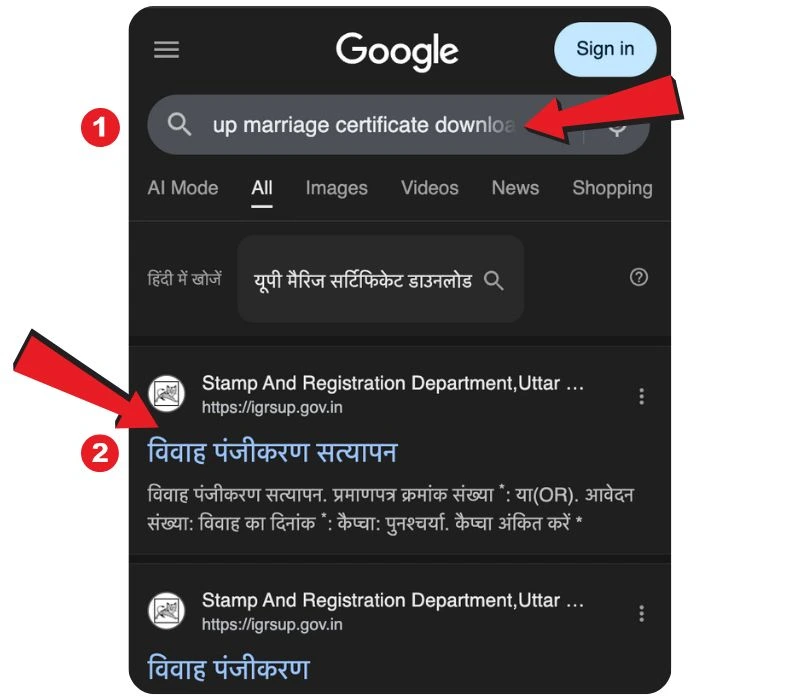
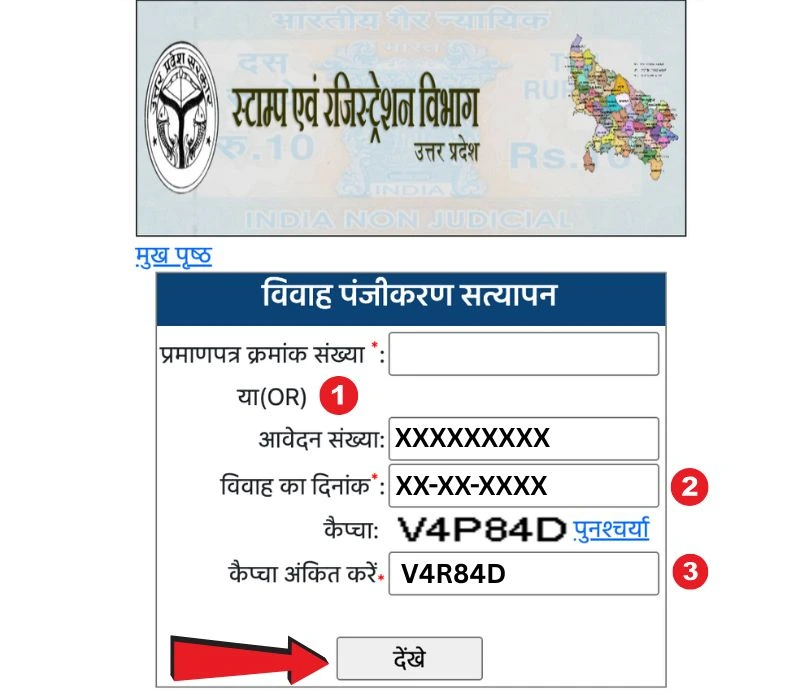
Step 2: Fill in all the Details correctly:
This is the most necessary step to download your Marriage Certificate. Once the form is open, fill in your details correctly.
- Application Number: The number you should have received during the process of issuing your Marriage Certificate.
- Date of Marriage: Now select the date of marriage using this calendar.
- Captcha: Enter the Captcha code correctly as shown on the screen.
Now click the “देखें” (View) button.
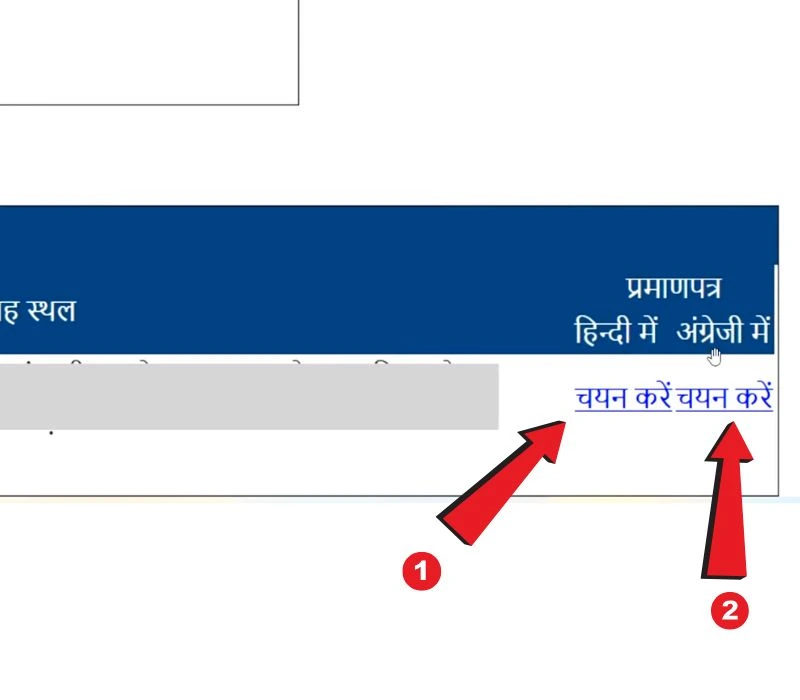
Step 3: Now choose the language in which you need your Certificate:
If you have done all the steps correctly, then you will be able to see all the necessary information so that you can verify the certificate. Look under “Pramanpatra” (Certificate) for two options:
- हिंदी में (In Hindi)
- अंग्रेज़ी में (In English)
Click on “चयन करें” (Select) for the language you prefer. This option can be seen in the right corner of the screen.
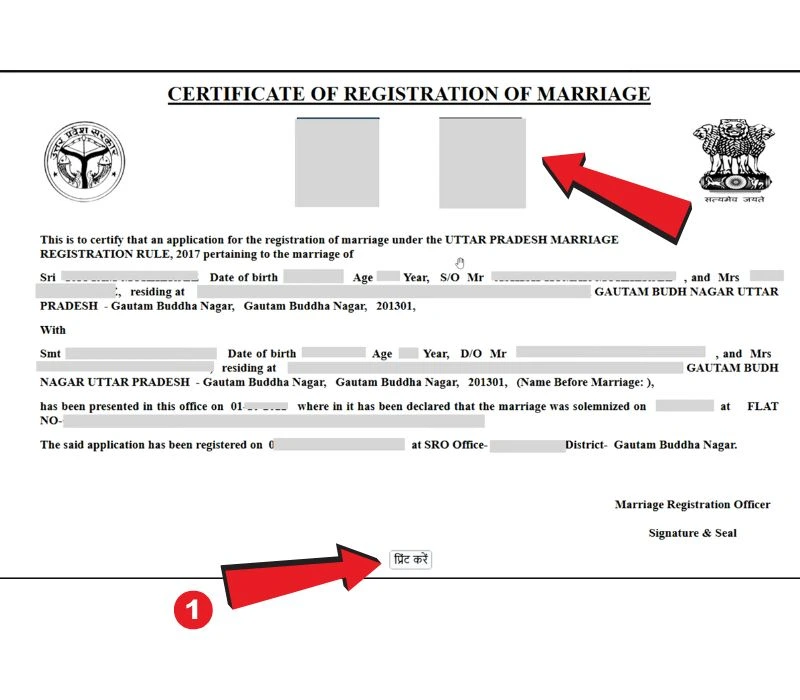
Step 4: You can Save or Print your Certificate:
After finishing the process, you have finally got your marriage certificate on your screen. Now it’s your choice whether to save it in the form of a soft copy or you can print it using a printer.
You can see the UP government logo on the certificate. Scroll to the bottom and click the “प्रिंट करें” (Print) button to save your certificate as a PDF File.
💡 यूपी मैरिज सर्टिफिकेट डाउनलोड (Hindi Guide)
- किसी भी browser या Google पर Search कीजिए: आपको अपने मोबाइल, डेस्कटॉप या लैपटॉप के किसी भी browser पर “UP Marriage Certificate Download” लिखकर Search करना होगा, Google के page पर आपको “विवाह पंजीकरण सत्यापन” का एक अधकारिक लिंक दिखाई देगा, आपको उसकर क्लिक करना है।
- अपनी सभी सही जानकारी दें: आपको अपनी शादी का प्रमाणपत्र का आवेदन नंबर और जिसकी भी शादी का प्रमाणपत्र निकलना चाहते है उनकी शादी की तारीख दर्ज कीजिए, आप दिए गए कैलेंडर की मदद ले सकते है। इसमें किसी भी तरह का पासवर्ड की जरूरत नहीं पड़ती है।
- शादी के प्रमाणपत्र की भाषा चुनिए: “देखें” के बटन को क्लिक करने के बाद, अब आपको नीचे दाये ओर “चयन करें” का बटन दिखाई दे रहा होगा, एक में आपको “हिंदी में” या “अग्रेज़ी में” यह दो विकल्प देखने को मिलेंगे।
- अपने शादी के प्रमाणपत्र को डाउनलोड या प्रिंट करें: अब आपको अपना शादी का प्रमाणपत्र सामने दिखाई दे रहा होगा, सबसे नीचे आपको “प्रिंट करें” का बटन दिखाई दे रहा होगा, उस पर क्लिक करके आप अपने प्रमाणपत्र को अपने मोबाइल या लैपटॉप पर save करके भी रख सकते है या फिर उसे प्रिंट करके भी रख सकते है।
यह था पूरा process अपने या किसी के भी शादी के प्रमाणपत्र को डाउनलोड या save करने का पूरा process, उम्मीद है कि आपको समझ में आ गया होगा। आप अपने सवालो को नीचे दिए गए comment section में पूछ सकते है।
Frequently Asked Questions (FAQs)
I forgot my Application Number. What should I do?
ou can search for your application number on the IGRSUP website by using the “Search Marriage” option using your name and district.
Can I download the certificate using only my Name?
No, for security reasons, you must have either the Application Number or the Certificate Number along with the correct Marriage Date.
Is this verification copy valid?
Yes, the “Verified” copy downloaded from the official verification link is a valid legal proof of your marriage.
Conclusion
I wish you had understood how to download your marriage certificate in Uttar Pradesh. The method was simple, and if you have any questions left, you are free to ask in our comment section.