
“Congratulations on your wedding! But wait, is the paperwork done yet?”
We know, after the celebrations, the last thing you want to do is run around government offices or struggle with complicated websites.
Earlier, you needed a “User ID” and “Password” to access your certificate. But let’s be honest—who remembers a password created months ago?
Here is the good news: The Uttar Pradesh Stamp and Registration Department (IGRSUP) has simplified the game. You do NOT need a password anymore to download or verify your certificate. If you know your Marriage Date and Application Number, you can get your certificate in just 2 minutes.
In this guide, we will show you this “Direct Method” which most agents won’t tell you.
⚠️ Disclaimer: We are NOT the official government website. This is an educational guide.
Quick Overview: UP Marriage Registration
| Feature | Details |
| State | Uttar Pradesh |
| Department | Stamp and Registration Department (IGRSUP) |
| Service Name | Vivah Panjikaran (Marriage Registration) |
| Official Website | igrsup.gov.in |
| Helpine Number | 1800 180 1476 |
How to Download UP Marriage Certificate (The “No-Password” Trick)
Forget the old boring way of logging in. Who remembers passwords anyway?
We are going to use the “Direct Verification Method”. It’s faster, easier, and you don’t need any user ID. Grab your phone and follow these 4 simple steps.
Step 1: Find the Official Govt. Link on Google
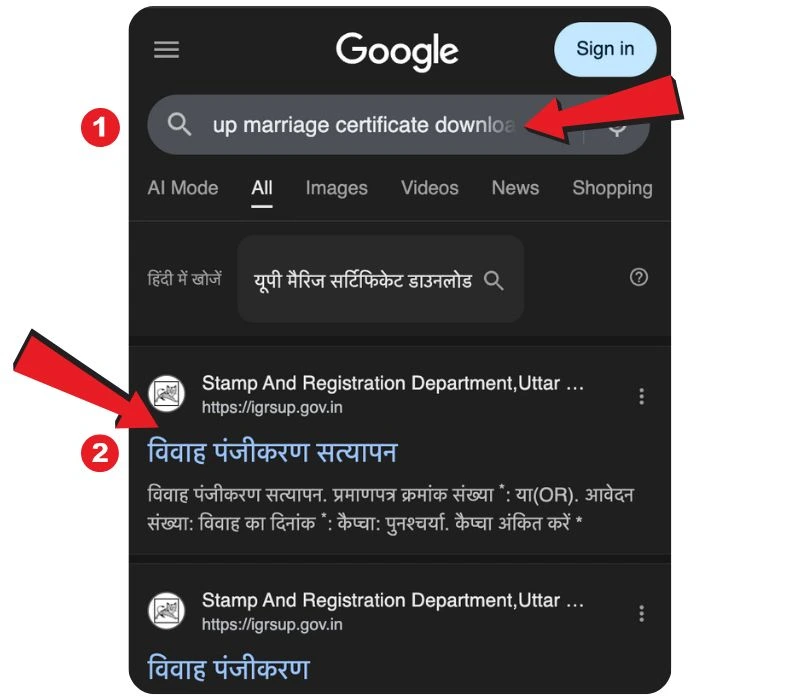
First, open Google on your mobile or PC and search for “UP Marriage Certificate Download”.
Now, don’t just click on the first link you see. Look for the specific sub-link that says “विवाह पंजीकरण सत्यापन” (Vivah Panjikaran Satyapan) under the official IGRSUP result.
(See the screenshot below—we have marked exactly where to click with Red Arrows):
Pro Tip: If you can’t find this link, just go to
igrsup.gov.inand find the “Verification” tab manually.
Step 2: Fill in the Magic Details
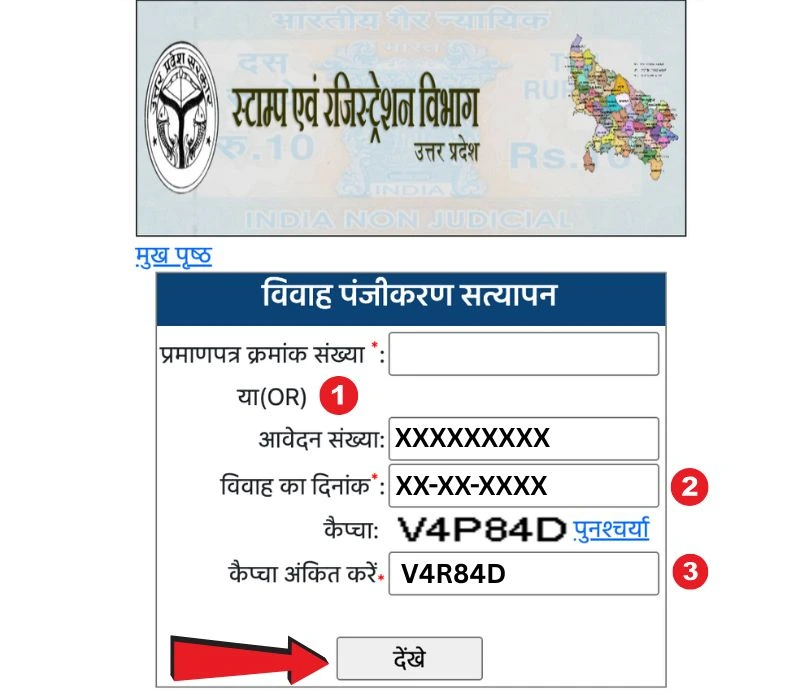
Once you click that link, a simple form will open up. You don’t need to login! You just need to prove that “Yes, this is my application.”
As shown in the image below, you only have to fill in 3 boxes:
- Application Number: Enter the number you got when you applied (Arrow 1).
- Date of Marriage: Be careful here! Select the exact date from the calendar (Arrow 2).
- Captcha: Type the funny-looking code into the box (Arrow 3).
Finally, hit the “देखें” (View) button.
Step 3: Choose Your Language (Hindi or English?)
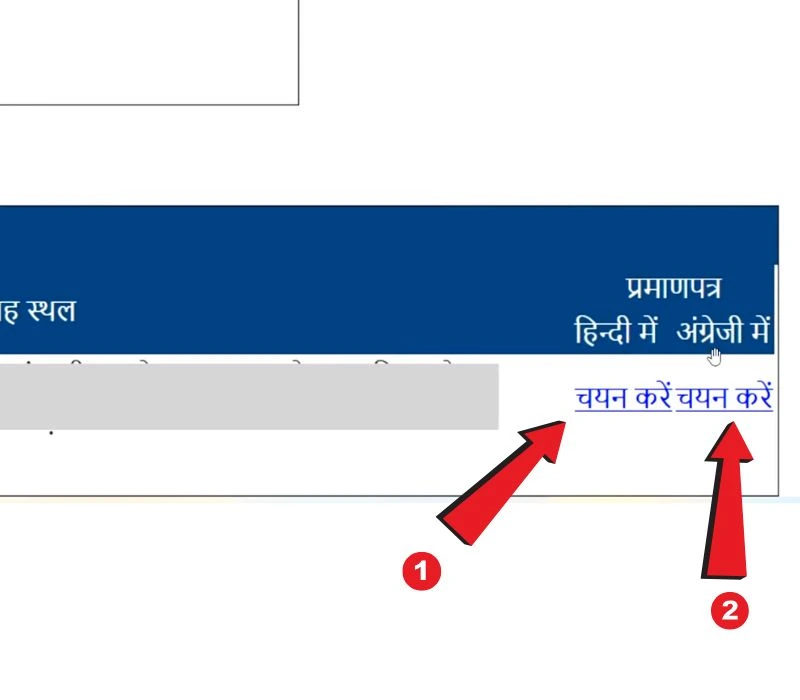
If your details are correct, your marriage record will appear on the screen immediately.
Now, look at the right side of the table. You will see two options under “Pramanpatra” (Certificate):
- Hindi mein (In Hindi)
- Angrezi mein (In English)
Why settle for one? You can download both! Just click on the blue link that says “चयन करें” (Select) as pointed out in the picture.
Step 4: The Final Print
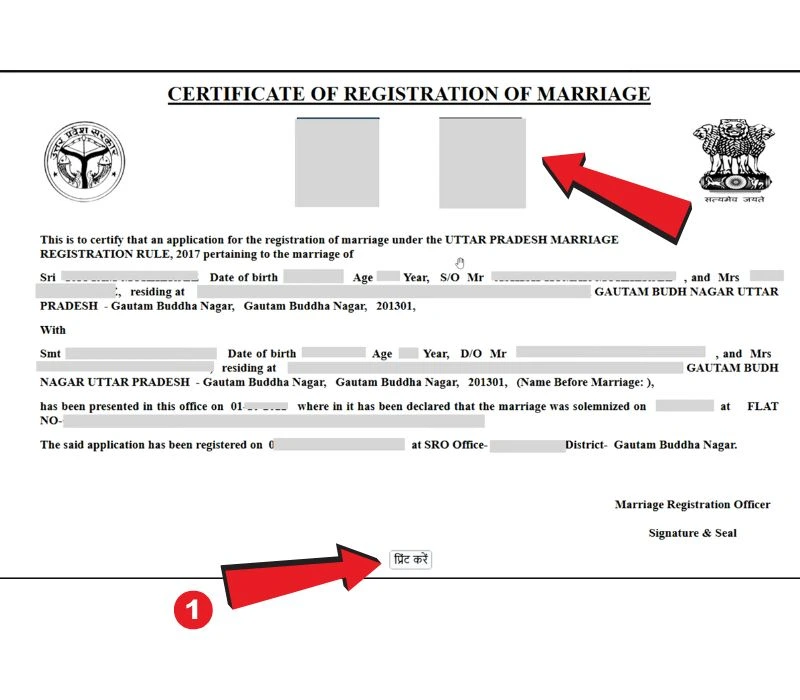
Congratulations! Your official digitally signed Marriage Certificate is now on your screen. It looks official with the UP Government logo and the Ashoka Emblem.
But wait, you are not done yet. Scroll down to the bottom of the certificate. You will see a small button called “प्रिंट करें” (Print). Click it and save the file as a PDF on your phone or laptop.
💡 यूपी मैरिज सर्टिफिकेट डाउनलोड (Hindi Guide)
दोस्तों, सर्टिफिकेट डाउनलोड करना अब बच्चों का खेल है!
अगर आपको इंग्लिश में समझने में दिक्कत हो रही है, तो बस नीचे दिए गए चित्रों (Images) को देखें और ये स्टेप्स फॉलो करें:
- Google पर खोजें: सबसे पहले Google पर “UP Marriage Certificate Download” लिखें और “विवाह पंजीकरण सत्यापन” वाले लिंक पर क्लिक करें (जैसा पहली फोटो में दिखाया है)।
- विवरण भरें: अब अपना आवेदन नंबर (Application No) और शादी की तारीख (Marriage Date) डालें। पासवर्ड की कोई जरूरत नहीं है! (दूसरी फोटो देखें)।
- भाषा चुनें: “देखें” बटन दबाने के बाद, आपके सामने लिस्ट आ जाएगी। आपको सर्टिफिकेट हिंदी में चाहिए या इंग्लिश में? बस “चयन करें” पर क्लिक करें।
- डाउनलोड करें: सर्टिफिकेट खुलने के बाद, सबसे नीचे “प्रिंट करें” (Print) बटन पर दबाएं और PDF सेव कर लें।
Important Rules for New Applicants
If you haven’t applied yet, keep these technical rules in mind to avoid rejection:
- 30-Day Rule: After applying online, you must visit the office within 30 days for verification.
- Photo Size: Couple’s photo must be under 40 KB (JPG format).
- Document Size: ID proofs must be under 70 KB (PDF format).
- Language: The form must be filled in both Hindi and English.
Frequently Asked Questions (FAQs)
I forgot my Application Number. What should I do?
ou can search for your application number on the IGRSUP website by using the “Search Marriage” option using your name and district.
Can I download the certificate using only my Name?
No, for security reasons, you must have either the Application Number or the Certificate Number along with the correct Marriage Date.
Is this verification copy valid?
Yes, the “Verified” copy downloaded from the official verification link is a valid legal proof of your marriage.
Conclusion
Downloading your UP Marriage Certificate is no longer a complicated task involving passwords and logins. By using the Verification (Satyapan) method, you can access your document instantly.
Just ensure your Marriage Date matches exactly with what you filled in the form.
Found this new trick helpful? Share this guide with others!